
A complete guide for business leaders, AP teams and tech sages
If you handle invoices, contracts, or purchase orders, you’re likely evaluating AI for data extraction to cut manual entry, speed cycle times, and improve accuracy.
The need is pressing: Gartner 1 estimates that 70–80% of enterprise information is unstructured, which makes automated capture and classification essential for downstream analytics and compliance.
At the same time, real-world AP results show the upside of modern document processing.
A recent study 2 on 212 teams among AP, Finance, Procurement and Treasury in EMEA, North America, and APAC, showed how using AI automation and e-invoicing allowed them to process invoices at $2.78 (vs. $12.88 for others) and achieve 49.2% straight-through processing (vs. 23.4%).
Understanding AI document extraction
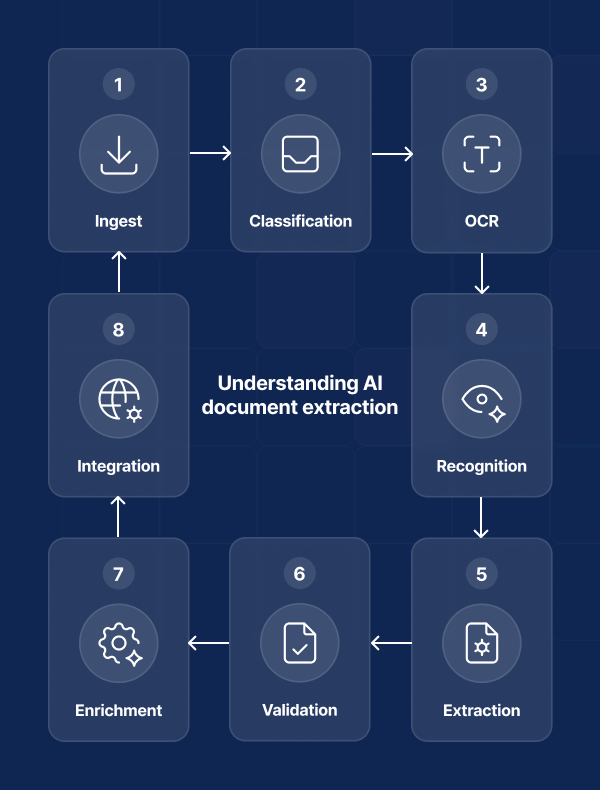
AI document extraction is an end-to-end pipeline that converts mixed-format inputs (PDFs, scans, images, emails) into clean, validated fields your systems can trust.
In practice, document AI for data extraction and AI for data analysis combine these capabilities:
- Ingestion and normalization: capturing data from email, scanners, cloud storage, or APIs, then normalizing files and image quality to prepare downstream steps.
- Classification: detecting the document type (invoice, receipt, purchase order, bill of lading, contract, ID) so appropriate models and rules apply.
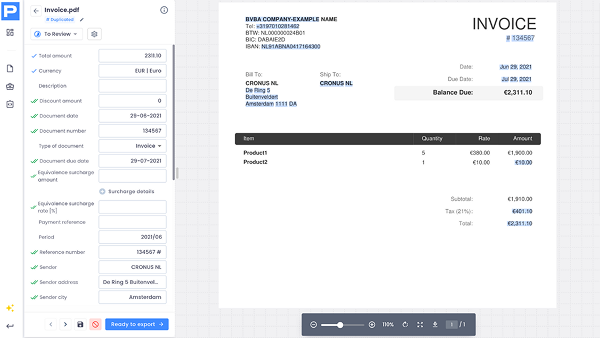
- OCR/ICR + layout understanding: using the best OCR software to read text (including handwriting) and interpret structure (tables, line items, headers/footers) to map fields like supplier, invoice number, dates, taxes, totals, SKUs, and payment terms, foundational to AI for document processing.
- Field-level extraction with validation: applying machine-learning entity extraction, then enforcing business rules (for example, VAT logic, three-way match, duplicate detection), with human-in-the-loop for exceptions or compliance.
- Enrichment and checks: augmenting with master data, exchange rates, and fraud signals to flag anomalies and reconcile totals so finance and operations can rely on the output for AI for data analysis.
- System integration: delivering structured data (plus originals and an audit trail) into ERPs, CRMs, accounting tools, and workflow platforms to keep AP/AR, payments, and reporting in sync with the correct integration.
OCR and ICR in document AI
Optical character recognition (OCR) and Intelligent character recognition (ICR) are the recognition engines that turn pixels into text your models can understand.
They sit at the front of the pipeline and determine how much usable signal reaches downstream AI for document processing, from layout parsers to entity extraction, validation and analysis.
Optical character recognition
It converts printed text from scans and PDFs into machine-readable characters that downstream models can tokenize and align to fields.
You can use OCR in several areas. Some core examples are:
- Invoice data extraction
- Receipt data extraction
- Purchase Order data extraction
- OCR APIs powered by AI
- Personal ID data extraction
Intelligent character recognition
It reads handwriting (cursive and block letters) and mixed forms, expanding coverage to receipts, delivery notes, expense slips, and annotated contracts.
Core capabilities: OCR and ICR in action
Both techniques exploit several capabilities at their core. Some of them are:
- Layout awareness: preserves positions, lines, and table structure so line items, totals, and headers remain intact for document AI for data extraction.
- Language and font handling: supports multilingual documents, accented characters, variable fonts, and low-contrast prints commonly seen in cross-border invoices.
- Noise resilience: deals with skew, blur, stamps, and backgrounds; image preprocessing (deskew, denoise, contrast boost) raises recognition quality before AI for data extraction runs.
- Confidence scoring: attaches per-character and per-word confidence, enabling rules like “auto-approve ≥ threshold” and routing uncertain fields to review.
- Handwriting plus printed hybrids: combines OCR for typed sections and ICR for notes/signatures so a single pass captures complete context for AI for data analysis.
- Privacy and security controls: redacts or masks sensitive fields (IDs, IBANs, card numbers) at the recognition layer to enforce least-privilege data flows.
Why this matters for performance
Garbage in, garbage out
Stronger OCR/ICR lifts field-level accuracy and reduces exception rates, which directly improves throughput and time-to-post in AP/AR.
Lower cost to accuracy
Cleaner recognition lowers the need for post-processing rules of thumb and manual reviews, improving straight-through processing in AI for document processing.
Broader coverage
ICR unlocks use cases where handwritten content is critical (proofs of delivery, expense notes, service tickets), expanding the scope of your automation program.
Behind AI data extraction - a technical deep-dive
Modern document AI combines computer vision, natural language processing, and workflow logic to turn unstructured files into accurate, auditable records.
Below are the core techniques that AP teams can use to achieve reliability in document processing and data extraction.
Template and rule-based extraction
This approach relies on anchors, regular expressions, and positional rules to capture consistent fields from predictable layouts. It’s fast, transparent, and ideal when a subset of suppliers or forms rarely change, giving teams deterministic control while broader AI for data extraction handles the long tail.
AP use case: your accounting team sets a rule pack for three high-volume utility vendors (VAT %, invoice number, due date). Those invoices post straight through to the ERP with zero touches, while exceptions route to review.
Layout-aware transformers
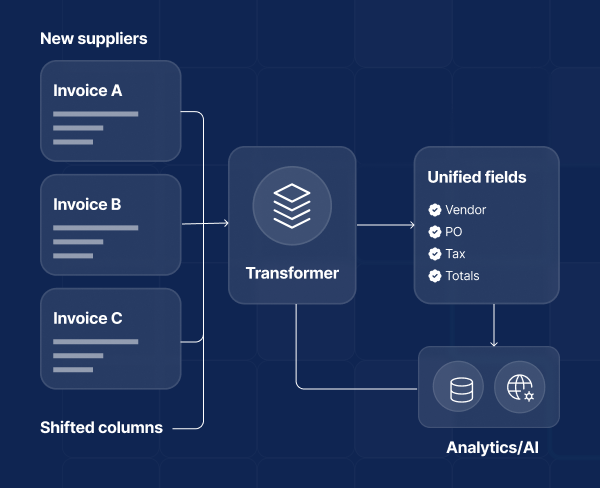
Models that combine text and spatial cues understand where words sit on the page, enabling robust field and line-item capture without brittle templates. They underpin scalable AI for document processing across mixed formats and supplier changes.
AP use case: new suppliers send invoices with shifted columns; the transformer still extracts vendor, PO, tax, and totals accurately, preserving AI for data analysis downstream.
Named entity recognition (NER)
NER tags business entities like supplier, invoice number, dates, VAT, totals, and payment terms by learning lexical patterns and context.
This improves precision over word matching, especially in multi-language environments.
AP use case: the team auto-captures Spanish “N.º de factura” and Dutch “factuurnummer” as the same field, reducing manual keying across regions.
Key–value pair detection
By detecting label regions and their associated values, the system captures fields even when wording varies (“invoice #”, “invoice no.”). This reduces dependence on exact phrasing.
AP use case: vendor A writes “PO no.” while Vendor B writes “purchase order reference”; both map to the PO field and feed three-way match checks.
Table and line-item parsing
Structure recognition segments rows and cells, then links descriptions, quantities, prices, and taxes into coherent line items, critical for approvals and spend analytics.
AP use case: AP imports full line items from a logistics invoice into the ERP, enabling automatic tax reconciliation and variance analysis by SKU.
ICR for handwriting
Intelligent character recognition extends OCR to cursive and block handwriting, capturing notes, signatures, and form fields on scanned documents.
AP use case: couriers annotate delivery notes with handwritten quantities; ICR captures the updates so the vendor invoice matches proof of delivery before payment.
Language modeling for normalization
Post-OCR language models correct noise and standardize entities (dates, currencies, tax IDs) using constrained decoding and dictionaries, improving downstream validations.
AP use case: “1O/11/25” is normalized to “10/11/2025,” preventing due-date errors and late-payment penalties.
Confidence scoring and calibration
Each field receives a confidence score; selective thresholds, calibration, and abstention route uncertain items to review while high-confidence data flows through.
AP use case: Invoices over €5,000 with vendor name <95% confidence trigger human review; sub-€5,000 invoices above threshold post automatically.
Business-rule validation
Rules enforce PO match, duplicate detection, VAT logic, currency conversions, and totals reconciliation so only consistent data reaches finance systems.
AP use case: the engine rejects an invoice where subtotal + tax ≠ total and flags a duplicate invoice number from the same supplier, avoiding double payment.
Anomaly and fraud detection
Similarity metrics, embeddings, and outlier detection spot unusual patterns, altered documents, or repeated requests that evade simple rules.
AP use case: a near-duplicate PDF with a modified bank account is flagged, prompting AP to confirm vendor banking details before releasing funds.

Active learning and human-in-the-loop
The system prioritizes ambiguous samples for review and learns from corrections, raising accuracy quickly with minimal labeling effort.
AP use case: reviewers fix “IVA” vs. “VAT” mappings on Iberian invoices; those edits retrain models weekly, reducing touches on future submissions.
Few-shot and weak supervision
Models adapt to new document types or suppliers with a handful of examples, bootstrapped by rules of thumb and synthetic data to speed coverage.
AP use case: after uploading five sample invoices from a new construction vendor, AP achieves >90% field accuracy without waiting for a long training cycle.
Multilingual and locale-aware models
Support for languages, number formats, and regional tax structures (EU VAT, IBAN) ensures consistent extraction across countries.
AP use case: the team processes Spanish, French, and Dutch invoices in one pipeline, with correct decimal separators and localized tax rules applied automatically.
Data governance and privacy controls
Field-level masking, PII redaction, and full audit logging keep sensitive data protected and traceable, aligning with GDPR and SOC 2 expectations.
AP use case: the supplier bank details can be set as masked for most users, while auditors can see a complete, timestamped trail of extraction, validation, and approvals.
The role of document AI in decision-making
Document AI turns unstructured documents into verified, real-time data, giving leaders a single source of truth to act on.
In fact, if you’re a business leader you might want to achieve:
Implementing an AI Document Extraction software with zero effort
Successful rollouts follow a simple path.
Start by scoping the flow: which documents (invoices, receipts, purchase orders), where they arrive (email, shared drives, scanners, API), who approves them, and the KPIs you care about (cycle time, straight-through processing, cost per invoice).
Next, define the data: the fields you must capture (vendor, dates, VAT, totals, line items) and the confidence thresholds or business rules (PO match, duplicate checks, totals reconciliation) that safeguard quality.
Then connect systems: map fields to your accounting or ERP and set posting and approval logic so verified data moves automatically.
Finally, manage exceptions and improvement: decide when to trigger human review, log an audit trail, and track accuracy so models get better over time.
The right automated data extraction platform helps with reducing the lift across each step.
It ingests mixed formats out of the box, applies OCR/ICR and layout understanding, and ships with common field mappings and connectors so its document AI can start quickly.
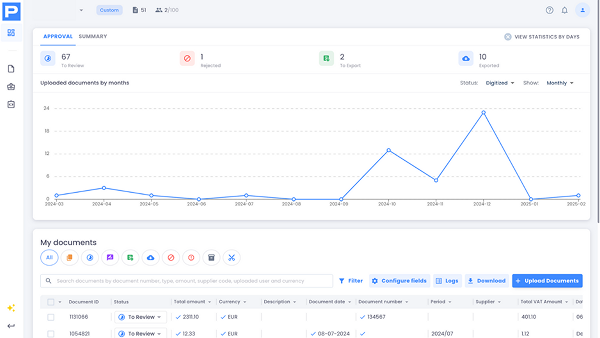
Dashboards surface the KPIs that matter, feeding AI for data analysis and giving leaders a clear line of sight from captured documents to business results.
Finally, you can rely on custom data extraction to adjust to specific templates, formats, and business needs overall.
Cross-industry applications of AI for document processing
From boutique firms to global operators, AI for document processing delivers the same core value: it converts messy, multi-format paperwork into reliable, ready-to-use data.
Accounting firms
Accounting practices live on documents: invoices, receipts, bank statements, contracts, and audit evidence.
AI for data extraction turns these into clean, coded entries that sync with the ledger, cutting prep time and rework.
Typical wins include automated capture of client invoices and expense receipts, GL code suggestions from line items, and exception routing for unusual VAT or duplicate numbers.
For audit and advisory, the same pipeline assembles workpapers with source files, timestamps, and approvals, supporting compliance while freeing staff to focus on higher-value analysis.
Finally, integrations with common accounting and ERP tools ensure that verified data flows straight into close, billing, and audit processes.
Travel and hospitality
AI for document processing standardizes mixed formats, extracts guest folio charges and taxes, reconciles vendor invoices against contracted rates, and flags variances before payment, making document and invoice automation for restaurants, hotels, and travel agencies possible.
These organizations handle a torrent of folios like OTA invoices, rate agreements, vendor bills, and expense reports, back-office teams can benefit from automated routing (for example, large invoices to multi-step approval, small recurring bills to straight-through posting) and from PII-aware redaction to protect IDs and payment data.
Result: faster month-end, tighter control of F&B and room-revenue costs, and a clean data feed for yield, budgeting, and cash-flow forecasts powered by AI for data analysis.
Logistics and transportation
Carriers, 3PLs, and shippers process bills of lading, proofs of delivery, packing lists, customs forms, and complex freight invoices.
AI for data extraction reads line items, quantities, surcharges, and accessorials, then validates totals and contract terms to catch errors like double billing or incorrect detention/demurrage.
Matching PODs to invoices reduces disputes and accelerates collections, while automated creation of AP entries shortens payment cycles with fewer touches: thus, operators gain clearer margin visibility by lane, customer, and mode, and can act faster on exceptions, claims, and profitability insights.
The future of AI document management
At Procys, we dominate the realm of document automation with AI, but its evolution never sleeps.
In our day-to-day operations, as well as in our industry investigations, we always try to stay ahead of the curve and predict what’s next for the leaders of the future.
For us, the next wave is practical: decision-makers should focus on governance-first, look for flexibility of the existing stack, and measure by straight-through outcomes.
Here’s a short recap about what to expect from AI-based data extraction and document processing in the short future.
Governance becomes the default design
Let’s have a look at recent regulations.
Regulatory timelines (like the EU AI Act applying key obligations in 2025–2027) push provenance, audit trails, and risk controls from “nice to have” to required product features.
We can only expect clearer model registries, dataset lineage, and role-based access in document workflows.
From automated to autonomous platforms.
Forrester 3 describes a shift in software testing from continuous automation to autonomous testing platforms powered by genAI “tester TuringBots”.
These can generate and maintain tests, adapt to change, and aim to push automation beyond the ~23–25% plateau to respond to faster dev cycles and AI app complexity.
By analogy, document AI will increasingly embed agentic capabilities that self-configure capture, self-heal field mappings, and orchestrate reviews, reducing manual maintenance and accelerating time to value.
Multimodal, layout-aware LLMs tame the long tail
Hybrid models that combine vision, layout understanding, and language will raise accuracy on novel or messy formats, shrinking exception queues while keeping human review for edge cases and policy-critical fields.
Operational analytics goes real time
As more documents are processed in-flow, leaders will expect live KPIs (cash position, accruals, price variances) powered by standardized data.
The data deluge makes this inevitable: IDC projected that the Global Datasphere would pass from 45 Zettabytes in 2019 to 175 Zettabytes by 2025 4.
Risk frameworks get productized
Enterprise buyers will look for built-in mappings guidance (for example, NIST AI RMF) to operationalize AI risk governance without bespoke consulting.
Think of documented controls, monitoring hooks, and evidence packs out of the box 5.
Conclusions
Document AI is no longer a moonshot: it’s a practical way to turn everyday paperwork into reliable, real-time data that improves accuracy, speeds cycle times, and strengthens compliance.
With precise data feeding your ERP and analytics, leaders get clearer visibility, faster approvals, and fewer exceptions, for AP teams across different industries.
If you want the benefits without the implementation drag, Procys lifts the effort with built-in OCR/ICR, validation, approvals, and integrations, so you can focus on outcomes, not tooling. Try Procys for free (no credit card required) and see how quickly AI for document processing moves from pilot to value.
Sources
1: Document Management Reviews and Ratings by Gartner
2: The State of ePayables 2024: Money Never Sleeps by Ardent Partners Ltd
3: The Evolution From Continuous Automation Testing Platforms To Autonomous Testing Platforms: A New Era In Software Testing by Forrester
4: The Digitization of the World From Edge to Core by IDC, 2025
5: Artificial Intelligence Risk Management Framework (AI RMF 1.0) by National Institute of Standards and Technology